.png)

.svg)



TL;DR:
- Most small and medium-sized businesses fail in paid advertising due to inadequate groundwork rather than platform choice. Proper campaign setup, including goal alignment, tracking, landing page optimization, and audience research, is essential for measurable results. Patience and strategic adjustments after the learning phase significantly improve ROI, with businesses that follow these principles outperforming impulsive, unstructured efforts.
Most small and medium-sized businesses that try paid advertising don’t fail because they chose the wrong platform. They fail because they skipped the groundwork. A poorly structured campaign burns through budget in days and delivers nothing but frustration. A properly executed step by step paid ads setup, by contrast, gives the algorithm what it needs to learn, gives your audience a reason to click, and gives your business a real chance at measurable returns. This guide walks you through every stage, from preparation to optimisation, in practical terms built for business owners and marketing managers who need results, not theory.
Table of Contents
- Key takeaways
- Before you spend: essential preparation
- Campaign setup: Google Ads and Meta Ads step by step
- Launching and reading early signals
- Optimising for real results after launch
- Our perspective: what actually works
- Ready to stop guessing and start growing?
- FAQ
Key takeaways
| Point | Details |
|---|---|
| Preparation prevents waste | Set up tracking, verify landing pages, and define goals before spending a single penny on ads. |
| Budget affects algorithm learning | Daily spend should be 3 to 5 times your target CPA so platforms can collect enough data to optimise. |
| Respect the learning phase | Avoid editing campaigns in the first 10 to 14 days or you risk resetting algorithm learning entirely. |
| Optimise beyond the ad | Poor ROAS often signals a landing page problem, not an ad problem. Fix the page before increasing spend. |
| Strategy beats impulse | Structured paid media strategies generate significantly higher conversion rates than reactive campaign launches. |
Before you spend: essential preparation
Skipping preparation is the single fastest way to waste your ad budget. Before you create a single campaign, you need to get several things in order.
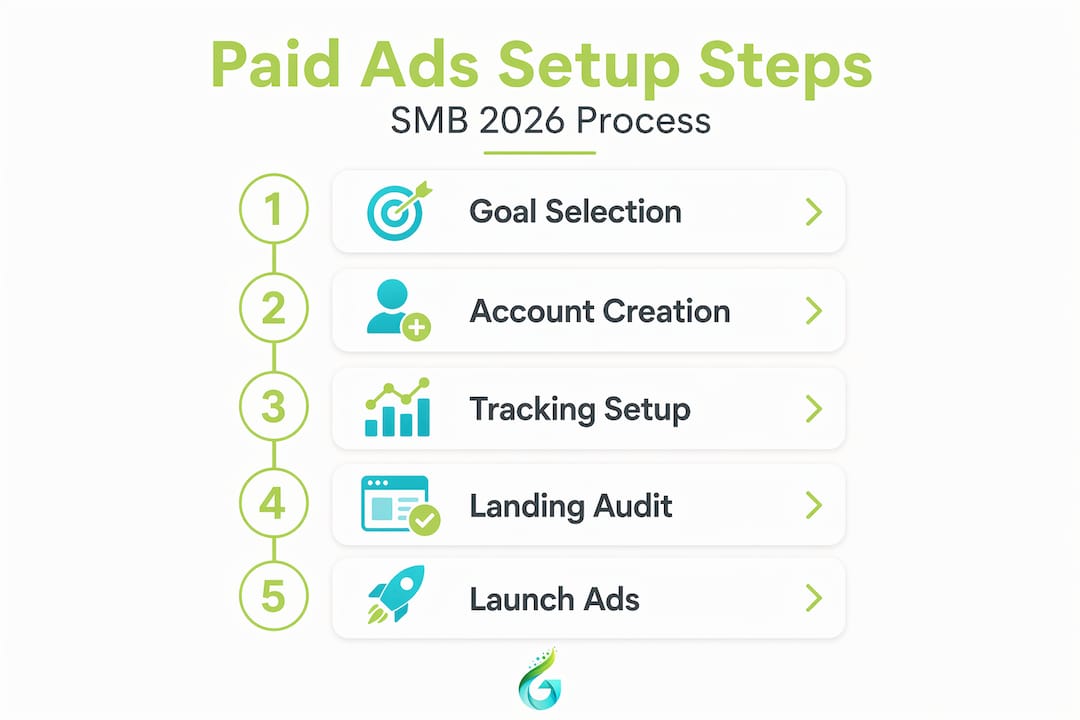
Align on business goals. Paid ads work best when they serve a specific, measurable objective. Are you trying to generate leads, drive product sales, or grow brand awareness? Your answer directly shapes your campaign structure, platform choice, and bidding strategy. Write the goal down. Make it measurable.
Create and verify your ad accounts. You will need a Google Ads account linked to your Google Business profile, and a Meta Business Manager account if you plan to run Facebook or Instagram ads. Use your actual business credentials, not personal accounts. This matters for billing, verification, and account recovery.
Install conversion tracking before anything else. Accurate conversion tracking is non-negotiable. Without it, AI bidding algorithms cannot optimise your ads effectively. Set up Google Analytics 4 and link it to Google Ads. Install the Meta Pixel on your website and verify it is firing on key actions like purchases, form submissions, or phone calls. Test every event.

Audit your landing pages. Your ad is only as good as the page it sends people to. Check load speed, mobile experience, and whether the page clearly matches the promise in your ad. A fast, relevant, well-converting landing page is more valuable than any bidding strategy.
Do your audience and keyword research. Map out who you are targeting and what they are searching for. Use Google Keyword Planner for search intent data. For Meta, explore interest categories and behaviours relevant to your customer profile. Mapping audiences across awareness, consideration, and decision stages improves targeting precision from the start.
Pro Tip: Build a short checklist before every campaign launch: tracking verified, landing page reviewed, billing confirmed, and goal documented. This takes 20 minutes and prevents hours of troubleshooting later.
Campaign setup: Google Ads and Meta Ads step by step
Once your foundations are in place, you are ready to build. Here is a practical paid ads setup tutorial covering both major platforms.
-
Log in and select your goal. In Google Ads, click “New Campaign” and choose a goal aligned to your business objective. Sales, leads, and website traffic are the most common. In Meta Ads Manager, select your campaign objective from options like Conversions, Lead Generation, or Traffic. Match the objective to what actually matters to your business.
-
Choose your campaign type. For Google, Search campaigns work well for capturing existing demand. Shopping campaigns suit e-commerce. Performance Max uses Google’s full inventory and AI to find conversions across all channels. For Meta, a Conversions campaign optimised for a purchase or lead event typically delivers the best results for direct response.
-
Define your targeting. Set your location, language, and for Meta, your demographic and interest targeting. Build a custom audience from your existing customer list or website visitors, then create a lookalike audience to expand your reach to similar people. On Google, your keywords do much of the targeting work.
-
Set your budget. Your daily budget should be at least 3 to 5 times your target cost per acquisition. If you want to acquire customers at £20 each, your starting daily budget should be £60 to £100. Anything less and the algorithm simply cannot collect enough signals to learn.
-
Choose your bidding strategy. Start with automated bidding. Maximise Conversions on Google and Lowest Cost on Meta are sensible starting points. Once you have collected 30 or more conversions in 30 days, you can shift to Target CPA bidding, which tends to deliver 25% more conversions at the same cost compared to manual bidding.
-
Build your ad groups and keywords. Group tightly themed keywords together. For example, a solicitor firm might have separate ad groups for “employment law advice” and “contract dispute solicitor”. Keep each group focused. Broad match keywords, when paired with strong AI-powered intent matching, now outperform traditional reliance on exact match alone.
-
Write your ad copy. Use Responsive Search Ads on Google, providing multiple headlines and descriptions so the platform can test combinations automatically. On Meta, test two to three creative variants per ad set. Your copy should lead with the customer’s problem, state your solution clearly, and end with a direct call to action.
| Element | Google Ads | Meta Ads |
|---|---|---|
| Campaign goal | Sales, leads, traffic | Conversions, leads, traffic |
| Ad format | Responsive Search Ads, Performance Max | Image, video, carousel |
| Targeting method | Keywords, audiences | Demographics, interests, custom audiences |
| Starting bid strategy | Maximise Conversions | Lowest Cost |
| Budget starting point | 3 to 5x target CPA daily | 3 to 5x target CPA daily |
Pro Tip: On Meta, craft your CTAs carefully. Button text like “Get a Free Quote” or “See Pricing” consistently outperforms generic options like “Learn More” when you are targeting warm audiences.
Launching and reading early signals
Pressing “Publish” is not the end. The first 10 to 14 days after launch are arguably the most important phase of your entire campaign.
Before you go live, run a final check. Confirm your Pixel or Google tag is firing on the right conversion events. Preview your ads across desktop and mobile. Verify that your billing details are correct and your account is active. A campaign that fails to spend because of a billing error wastes your launch window.
Once live, watch these metrics closely:
- CPM (cost per thousand impressions): A very high CPM often signals poor audience targeting or low ad relevance.
- CTR (click-through rate): Below 1% on search ads usually means your copy or match types need attention.
- Cost per result: Is this tracking toward your CPA target, or spiralling beyond it?
- Frequency (Meta only): If frequency climbs above 3 within two weeks, your audience is too small or your creative is getting stale.
The most important rule during this phase: do not touch the campaign. Premature edits reset the algorithm’s learning process entirely. Budgets below £20 to £30 per day also prevent meaningful optimisation because the platform cannot gather enough data to make smart bid decisions.
“Patience during the learning phase is not passive. It is one of the most strategic decisions you can make as an advertiser.”
Once performance stabilises, scale budgets gradually. A 15 to 20% budget increase every 5 to 7 days is a safer approach than doubling spend overnight, which can shock the algorithm and destabilise costs.
Pro Tip: Set a calendar reminder for day 14 post-launch to do your first proper performance review. Before that date, observe and note, but resist the urge to change.
Optimising for real results after launch
After the learning phase, your job shifts from patience to precision. Here is a structured approach to optimisation.
-
Evaluate ROAS and CPA against your targets. If your cost per acquisition is significantly above your target, do not immediately increase budgets or switch bidding strategies. First, ask whether the problem is the ad or what happens after the click.
-
Check your landing page. Many advertisers spend weeks tweaking ad copy when the real bottleneck is a slow, confusing, or unconvincing landing page. If your page conversion rate is below 2%, fix the page before touching the ads. A stronger page often delivers more ROI than any bidding adjustment.
-
Segment your audiences. Break down performance by age, device, location, and time of day. You may discover that mobile users convert at half the rate of desktop users, or that Friday evenings drive twice the leads at lower CPCs.
-
Apply dayparting strategically. B2B campaigns tend to perform best during business hours. B2C often peaks at weekends. Use historical data, not guesswork, to allocate more budget to high-intent periods and reduce spend during low-conversion windows.
-
Refresh your creatives. Ad fatigue sets in faster than most people expect. Plan a creative refresh every four to six weeks. Test new headlines, imagery, or offers. Use A/B testing properly: change one variable at a time so you know what actually drove the change in performance.
-
Upgrade your bidding strategy. Once you have enough conversion data, shift to Target CPA on Google or Cost Cap on Meta. These give you more control over efficiency at scale. For a broader view of how to build a strategy around these principles, the paid ads ROI guide from Geo Growth Media is worth reviewing.
| Optimisation lever | When to apply it | Expected outcome |
|---|---|---|
| Landing page improvements | CPA above target, low page conversion | Better conversion rate, lower CPA |
| Dayparting | After 4 weeks of data | Improved budget efficiency |
| Creative refresh | Frequency above 3, CTR declining | Renewed audience engagement |
| Target CPA bidding | 30+ conversions collected | More conversions at stable cost |
Our perspective: what actually works
I have seen a lot of paid ads campaigns go wrong. And honestly, most of them fail for the same two reasons: they launch without proper tracking, or they panic and cut budgets before the algorithm has had time to breathe.
What I have learned from working with SMBs across different sectors is that the businesses that see the best results are rarely the ones with the biggest budgets. They are the ones with the clearest goals, the most relevant landing pages, and the patience to let campaigns find their footing. A structured strategy, as the data confirms, generates 3.2x higher conversion rates than reactive, impulsive campaign launches.
The uncomfortable truth is that a great ad sending people to a mediocre page is just an expensive way to generate disappointment. Before you crank up ad spend, get the fundamentals right. The paid advertising checklist we use with clients is a good place to start if you want a practical benchmark.
Creative testing matters too, but not in the way most people think. Testing ten ad variants at once tells you nothing useful. Test two. Read the data. Then test two more. That discipline compounds over time into a real competitive advantage.
— Geo Growth Media
Ready to stop guessing and start growing?
Setting up paid ads properly takes time, expertise, and a willingness to invest in the learning process. But you do not have to do it alone.
At Geo Growth Media, we manage paid social media campaigns on Meta, TikTok, and LinkedIn for SMBs that want measurable growth without wasted spend. We handle everything from account setup and pixel configuration to creative testing and ongoing optimisation. If your campaigns are not converting, or you want to launch for the first time with confidence, we also offer landing page design built specifically to improve ad performance. Get in touch with Geo Growth Media to explore how a tailored paid advertising strategy can work for your business.
FAQ
What is the minimum budget to start paid ads?
Your daily budget should be at least 3 to 5 times your target cost per acquisition. Budgets below £20 to £30 per day typically prevent the algorithm from collecting enough data to optimise effectively.
How long does it take for paid ads to start working?
Most campaigns need 10 to 14 days in the learning phase before producing reliable results. Making significant edits or cutting budgets during this period resets the algorithm and delays performance.
Should I run Google Ads or Meta Ads first?
Google Ads works best for capturing people actively searching for your product or service. Meta Ads excel at reaching targeted audiences based on interests and behaviour. Your choice depends on whether demand already exists or needs to be created.
Why are my paid ads not converting?
Poor conversion rates are often caused by landing page issues rather than ad setup problems. If your page is slow, unclear, or mismatched to the ad message, fixing it will deliver more improvement than adjusting bids or copy.
When should I switch to Target CPA bidding?
Switch to Target CPA once you have collected at least 30 conversions in a 30-day period. Before that threshold, automated bidding strategies like Maximise Conversions give the algorithm more flexibility to learn.


.png)