.png)

.svg)




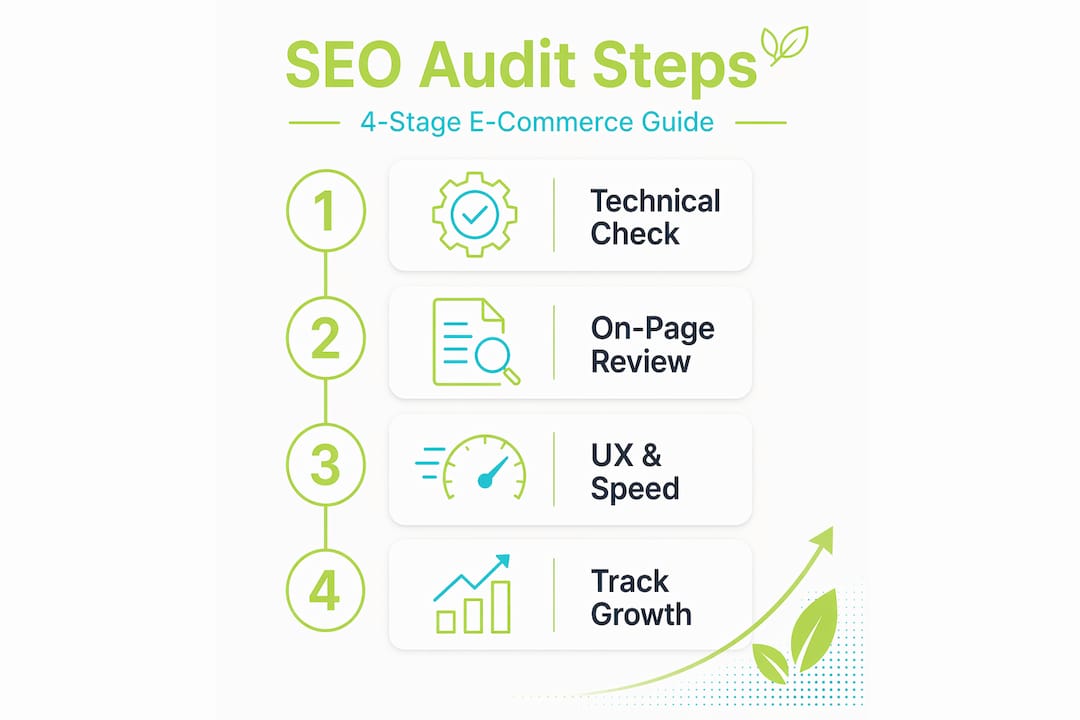
Every day your product pages sit invisible in search results, a competitor takes the sale you should have won. Hidden technical errors, poorly optimised metadata, and slow page templates quietly drain revenue from e-commerce stores of every size. The good news? Most of these problems are entirely fixable once you know where to look. A well-structured 360-degree SEO audit covering technical health, on-page signals, user experience, and off-page authority gives you a clear picture of what is holding your store back and exactly what to do next.
Table of Contents
Key Takeaways
PointDetailsAudit structure mattersUsing a step-by-step framework makes SEO audits thorough and actionable for e-commerce.Technical checks firstConfirm your pages are crawlable and indexed before focusing on other SEO factors.Structured data is criticalAlways check that your product schema matches live data for price and stock.Speed and UX drive salesImprovements to Core Web Vitals can boost both your rankings and your conversion rate.Prioritise for impactSort fixes by business value and effort to maximise the audit’s effect on sales growth.
What you need: tools and prerequisites for a successful SEO audit
Before you start the audit process, make sure you have the right resources at hand. Running an e-commerce SEO audit without the proper tools is like diagnosing a car fault without a diagnostic reader. You might spot the obvious problems, but you will miss the ones buried under the surface. Luckily, we've gained a wealth of experience within the ecommerce sector over the years, and can support.
Essential tools and platforms
Understanding how technical SEO can boost website search performance starts with having all these data sources connected before you begin. It is also worth noting that your CMS choice can influence how these tools interact with your site; for example, SEO in WordPress environments involves specific plugin configurations that affect how crawlers read your pages.
Audit areaPrimary toolData neededIndex coverageGoogle Search ConsoleCoverage report, sitemap dataOn-page signalsScreaming Frog / crawlerTitles, meta, H1 data exportStructured dataRich Results TestSchema markup codePerformance / CWVPageSpeed InsightsField and lab dataBacklinks / authorityAhrefs or similarLink profile, referring domains
Pro Tip: Before running a crawl, speak to your development team about any JavaScript-rendered pages or staging environment blocks. Crawlers can accidentally ignore entire sections of your store if robots.txt rules are too restrictive on the live site.
Step 1: Audit technical SEO and index coverage
With your tools lined up, it is time to dive into the foundational technical checks. If Google cannot reliably crawl and index your pages, everything else you do for SEO is wasted effort.
How to check indexability step by step
“Verifying indexability means confirming that key pages can be crawled, indexed, and correctly included in sitemaps. Search Console’s coverage signals are the most reliable diagnostic for non-indexed pages.” — Search Console guidance for e-commerce audits.
For stores running WooCommerce, technical SEO for WooCommerce environments includes platform-specific indexing quirks around product variations and archive pages that need careful attention. You can read more about the broader picture in our guide to why technical SEO matters for business growth, and see how our ecommerce SEO services approach these issues systematically.
Pro Tip: In Search Console’s URL Inspection tool, run both a “live URL” test and check the cached version. If the live test passes but the page is still excluded in the coverage report, the issue is usually a crawl scheduling delay rather than a hard technical blocker.
Step 2: On-page SEO, structured data and image optimisation
Once technical basics are secure, reinforce every page’s search value with on-page optimisations. This is where many stores leave significant ranking potential on the table.
On-page checklist for product and category pages
Structured data deserves particular attention. Product schema supports richer product experiences in Google results, but the implementation must match the on-page reality. If your schema says a product costs £29.99 but the page displays £34.99 due to a pricing update, Google will suppress the rich result. Validate every implementation with the Rich Results Test and schedule re-validation after any pricing or stock changes.
For images, Google’s image best practices make clear that discovery depends heavily on image landing page content and metadata. Filename, alt text, and surrounding copy all contribute to how images appear in Google Search and Google Shopping.
Structured data validatorStrengthsLimitationsGoogle Rich Results TestOfficial, shows eligibility clearlyTests single URLs onlySchema Markup ValidatorChecks all schema typesDoes not confirm Google eligibilitySearch Console Rich Results reportShows site-wide errors at scaleSlower to update than direct testing
Our content planning guide for e-commerce growth covers how to structure category page content for maximum search relevance. For a practical overview of on-page e-commerce SEO approaches, the fundamentals translate across most platforms.
Step 3: User experience, Core Web Vitals and performance checks
With page-level optimisations handled, now tackle site experience and speed, the backbone of both search rankings and user satisfaction. This step is where SEO and conversion rate optimisation converge most powerfully.

Core Web Vitals (CWV) are Google’s framework for measuring real-world page experience. The three key metrics are Largest Contentful Paint (LCP), Interaction to Next Paint (INP, which replaced FID), and Cumulative Layout Shift (CLS). For e-commerce, auditing CWV using real-user data from Search Console is essential because performance problems are often systemic across templates, meaning a slow product card component will affect every page that uses it.
Core Web VitalGood thresholdPoor thresholdE-commerce impactLCPUnder 2.5 secondsOver 4 secondsSlow hero images hurt first impressionsINPUnder 200msOver 500msSluggish add-to-cart buttons lose salesCLSUnder 0.1Over 0.25Layout shifts during checkout cause abandonment
How to fix CWV issues systematically
Performance improvements on e-commerce sites that move pages from “Poor” to “Good” Core Web Vitals can improve conversion rates by up to 17%. That is not just an SEO win; it is a direct revenue gain. For a deeper look at website speed and e-commerce performance, the relationship between load time and basket abandonment is well-documented and worth quantifying for your own store.
Pro Tip: Do not rely solely on lab data from Lighthouse. Lab data simulates a single visit under controlled conditions. Real-user data from Search Console reflects actual visitor devices, connections, and behaviour, and it is what Google uses for ranking purposes.
Step 4: Prioritising fixes and tracking ongoing gains
After making improvements, ensure your efforts translate to both search visibility and revenue by closing the audit loop. This final step is what separates a one-off exercise from a genuine growth engine.
How to score and action your findings
KPI to trackWhy it mattersReview cadenceIndex coverageConfirms technical fixes are workingWeekly post-fixOrganic click-through rateReflects on-page and schema qualityMonthlyCore Web Vitals pass rateValidates performance improvementsMonthlyOrganic revenueConnects SEO effort to business growthMonthlyAdd-to-cart rate from organicLinks rankings to commercial outcomesMonthly
The relationship between SEO and business growth becomes tangible when you track these metrics together rather than in isolation. If you are still weighing up whether regular audits are worth the investment, our article on why invest in SEO lays out the commercial case clearly. Audit every three to six months at minimum, and always re-audit after major site migrations, platform upgrades, or significant content changes.
What most e-commerce SEO audits miss: lessons from the field
To put your audit results in perspective, here is what really moves the needle from hard-won experience working with e-commerce businesses across multiple sectors.
Standard checklists are a starting point, not a finish line. The most damaging SEO problems we encounter are rarely caught by automated tools. They are structural. A client once had a faceted navigation system generating over 40,000 near-duplicate URLs, none of which were blocked from crawling. The crawl budget was almost entirely consumed on worthless filter combinations, meaning Google rarely reached the actual product pages. No generic audit checklist flagged it. Only a human with commercial and technical context spotted the pattern.
The second pitfall is treating audit completion as the goal. We see businesses fix every issue on their checklist and then measure success purely by ranking improvements. Rankings are a lagging, indirect indicator. The real question is whether add-to-cart rates from organic traffic went up. Did checkout completion improve on the pages you sped up? If you cannot answer those questions, you have not closed the loop. Our approach, informed by e-commerce SEO best practices, always connects technical remediation to commercial performance metrics.
Finally, audits need to be living processes. Seasonal product launches, CMS updates, and promotional landing pages introduce new issues constantly. A quarterly audit rhythm, combined with automated Search Console monitoring, keeps you ahead of problems rather than reacting to traffic drops.
Take your e-commerce SEO further with expert support
If you need help turning insights into action, expert support can make all the difference. Running a thorough audit is one thing; implementing fixes across a large product catalogue while managing a growing business is another challenge entirely.
At Geo Growth Media, we offer specialised e-commerce SEO services designed to identify exactly the kind of deep-rooted issues this guide describes, and then action them with precision. Our expert technical SEO team works as an extension of your marketing function, translating audit findings into prioritised development briefs and measurable revenue improvements. Whether you are a growing direct-to-consumer brand or an established retailer, our digital marketing for ecommerce expertise spans the full funnel, from search visibility to conversion optimisation.
Frequently asked questions
How often should I carry out an e-commerce SEO audit?
You should audit every three to six months or after major site changes to stay ahead of both technical issues and SEO algorithm shifts. Continuous Search Console monitoring between audits helps catch emerging problems early.
What’s the fastest way to check if Google is indexing my product pages?
Use Google Search Console’s URL Inspection tool for instant, page-level indexing status showing the last crawl date, canonical assignment, and eligibility to rank.
Why is structured data crucial in an e-commerce SEO audit?
Structured data enables enhanced Google listings with price and availability information, but it must match on-page product details exactly and be validated regularly to avoid rich result suppression.
How can Core Web Vitals fixes affect my sales?
Improving Core Web Vitals can directly boost mobile conversion rates alongside search visibility, because faster, more stable pages reduce friction at every step of the buying journey.
What’s the best way to prioritise fixes from an e-commerce SEO audit?
Score issues by severity, business impact, and fix effort rather than working through a generic checklist, ensuring that the issues with the greatest commercial consequence are resolved first.


.png)