.png)

.svg)




TL;DR:
- User experience is now a critical factor in Google’s ranking algorithm, influencing search performance through web design quality. Optimizing page speed, navigation, and mobile usability directly enhances engagement signals like time on page, CTR, and scroll depth, which Google considers in rankings. An integrated approach combining UX and SEO strategies ensures long-term visibility and higher conversions, emphasizing the importance of core Web Vitals and user-centered design.
User experience (UX) is a direct ranking factor in Google’s algorithm, not a secondary concern for designers. The role of UX in SEO has shifted from optional polish to core strategy, driven by Google’s Core Web Vitals update and its 2026 emphasis on Interaction to Next Paint (INP). If your site is slow, hard to navigate, or broken on mobile, rankings will suffer regardless of how strong your content is. This guide breaks down exactly how UX design decisions affect search performance, which metrics matter most, and what you can do about it right now.
How does UX design impact SEO performance?
UX design and SEO share the same goal: give users what they need, quickly and clearly. When your site fails on that front, Google notices through the signals users leave behind.

Page speed is a ranking signal, not a nice-to-have
Page speed affects both user satisfaction and crawl efficiency. Google uses Largest Contentful Paint (LCP) as part of its Core Web Vitals framework to measure how fast the main content loads. A slow LCP tells Google your page delivers a poor experience, and rankings drop accordingly.
Navigation shapes bounce rate and crawlability
Nearly 94% of users cite easy navigation as the most important website feature. That figure is significant because bounce rate and dwell time are both influenced by how quickly users find what they came for. Poor navigation sends users back to the search results page, which signals to Google that your content did not satisfy the query.
Logical site architecture benefits both crawlers and real users. When pages are structured clearly, Google can index your content more efficiently and users can complete their goals without friction.
Mobile usability affects conversions and rankings
Google indexes the mobile version of your site first. Users experiencing negative mobile UX are 62% less likely to complete a purchase. That drop in conversion is also a drop in positive engagement signals, which feeds back into your rankings. Mobile-first design and responsive layouts are no longer optional for competitive search visibility.
Core web vitals: the three metrics you cannot ignore
Google’s Core Web Vitals measure three specific UX dimensions:
- LCP (Largest Contentful Paint): How fast the main content loads. Target under 2.5 seconds.
- INP (Interaction to Next Paint): How quickly the page responds to user input. Replaced First Input Delay in 2024 and is now a confirmed ranking signal.
- CLS (Cumulative Layout Shift): How much the page layout shifts unexpectedly during load. A high CLS score frustrates users and signals instability.
Each of these metrics is a direct measure of UX quality. Fail them and you are handing ranking positions to competitors who have not.
Traditional SEO vs. integrated UX and SEO strategies
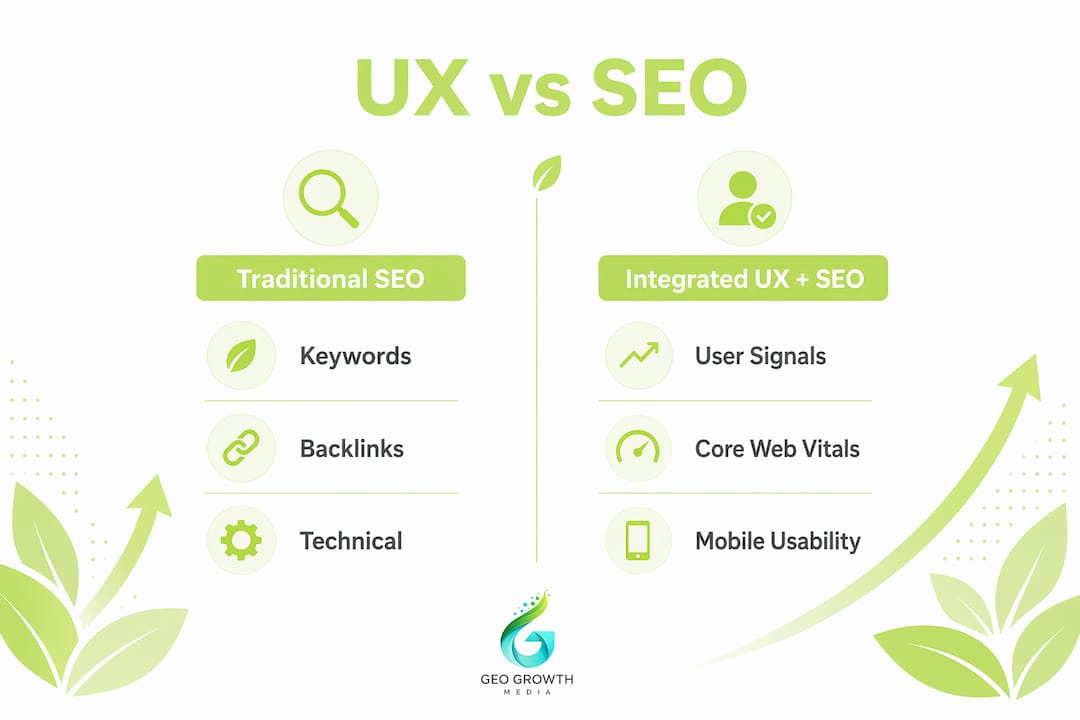
The old model of SEO focused almost entirely on keywords, backlinks, and technical crawlability. That approach still matters, but it is no longer sufficient on its own.
Confusing navigation and slow-loading pages increase bounce rate and send negative signals to Google, even when the content itself is well-optimised. A page ranking on page one for a competitive keyword will lose ground if users consistently leave within seconds. Google interprets that behaviour as a relevance failure.
The integrated approach treats UX and SEO as one discipline. You optimise for crawlers and for humans simultaneously. The results are measurably different.
| Metric | Traditional SEO Focus | Integrated UX + SEO Focus |
|---|---|---|
| Primary goal | Keyword rankings and backlinks | Rankings, engagement, and conversions |
| Navigation design | Structured for crawlers | Structured for users and crawlers |
| Page speed | Addressed as a technical fix | Treated as a UX and ranking priority |
| Mobile experience | Responsive as an afterthought | Mobile-first by design |
| Success measure | Position in SERPs | Position, dwell time, and conversion rate |
The contrast is clear. Traditional SEO can get you onto page one. Integrated UX and SEO keeps you there and converts the traffic once it arrives.
Pro Tip: Run a Google Search Console Core Web Vitals report alongside a session recording tool like Microsoft Clarity or Hotjar. The combination shows you both the technical score and the actual user behaviour causing it.
Why do engagement signals matter to google’s algorithm?
UX and UI design decisions directly affect SEO rankings by influencing user engagement, bounce rates, and time on page. Google’s 2026 algorithm treats these behavioural signals as quality indicators. A page that keeps users engaged is a page that deserves to rank.
The key engagement signals Google monitors include:
- Time on page: Longer sessions suggest the content satisfied the user’s intent.
- Click-through rate (CTR): A high CTR from the search results page signals that your title and meta description match what users want.
- Bounce rate: A high bounce rate on a landing page suggests a mismatch between the search query and the page content or experience.
- Scroll depth: Users who scroll further are more engaged. Shallow scroll depth on long-form content is a warning sign.
Poor UX creates a compounding problem. A slow, cluttered page increases bounce rate, reduces time on page, and lowers CTR over time as Google deprioritises the listing. Even excellent content cannot fully compensate for a broken experience. You can read more about why investing in SEO pays off long term when these signals are working in your favour.
INP deserves specific attention here. It measures the delay between a user’s interaction (clicking a button, tapping a menu) and the page’s visual response. A sluggish INP score tells Google the page feels unresponsive. For e-commerce sites and lead generation pages, that friction directly reduces conversions and engagement signals simultaneously.
Pro Tip: Do not treat bounce rate as a standalone metric. A user who reads a 2,000-word article and then leaves has a high bounce rate but strong engagement. Use scroll depth and time on page together for a more accurate picture.
Practical strategies to improve UX for SEO gains
Improving the UX and SEO relationship on your site does not require a full redesign. These are the changes that deliver measurable results.
-
Adopt mobile-first design from the start. Build and test every page on mobile before desktop. Google’s mobile-first indexing means the mobile version is what gets crawled and ranked. A layout that works on desktop but breaks on a 375px screen will cost you rankings.
-
Simplify your navigation structure. Reduce top-level menu items to the most important destinations. Deep, complex menus confuse users and dilute crawl budget. Aim for users to reach any page within three clicks from the homepage.
-
Compress images and remove intrusive pop-ups. Image compression and pop-up removal accelerate page rendering and reduce friction for both users and crawlers. Use WebP format for images and lazy-load anything below the fold.
-
Add schema markup to key pages. Schema markup helps Google understand your content and can generate rich results in the SERPs, improving CTR without changing your rankings directly. Product pages, FAQs, and review sections all benefit from structured data.
-
Run regular usability testing. Tools like Google PageSpeed Insights, Lighthouse, and Microsoft Clarity give you both technical scores and behavioural data. Review them monthly, not quarterly. Algorithms update frequently and a score that passed six months ago may now be a liability.
For a structured approach to applying these changes, the SEO best practices checklist for SMBs covers the technical and UX elements worth auditing together.
Pro Tip: Pair your Core Web Vitals data with heatmaps from Hotjar or Microsoft Clarity. You will often find that the pages with the worst LCP scores are also the ones where users drop off before reaching your call to action.
Key takeaways
Good UX and strong SEO are the same investment, not two separate budgets competing for priority.
| Point | Details |
|---|---|
| UX is a ranking factor | Google’s Core Web Vitals and INP directly measure UX quality as search signals. |
| Navigation drives engagement | 94% of users prioritise easy navigation, making it central to reducing bounce rate. |
| Mobile-first is non-negotiable | Google indexes mobile versions first; poor mobile UX reduces both rankings and conversions. |
| Engagement signals matter | Time on page, CTR, and scroll depth tell Google whether your page satisfied user intent. |
| Integrated strategy wins | Combining technical SEO with human-centred design produces better rankings and conversion rates than either approach alone. |
Geo growth media’s take on UX and SEO
Working with clients across multiple sectors, we have seen the same pattern repeat itself. A business invests heavily in content and backlinks, climbs to page one, and then watches rankings slide within three months. Almost every time, the culprit is a UX problem that was never addressed: a mobile layout that breaks on certain devices, a navigation structure that confuses new visitors, or a page speed score that looked acceptable on desktop but failed on 4G.
The uncomfortable truth is that Google’s algorithm has become a proxy for user satisfaction. When you fix the experience, the rankings follow. When you ignore the experience, no amount of link building will hold your position permanently.
What we find works best is treating UX and SEO as a single brief from the start of any project. Design teams and SEO practitioners need to be in the same room, or at least the same Slack channel. The designer needs to understand Core Web Vitals. The SEO needs to understand why a cluttered above-the-fold layout kills dwell time. When those two perspectives merge, the results compound quickly.
The marketers who will win in 2026 are not the ones with the most backlinks. They are the ones whose sites load fast, feel intuitive, and give users exactly what they searched for. That is not a design philosophy. That is an SEO strategy.
— Geo Growth Media
Take your SEO and UX further with geo growth media
If this article has made one thing clear, it is that strong search performance depends on more than keywords and content. It depends on the experience your website delivers from the first click.
Geo Growth Media specialises in SEO services that account for both technical performance and user experience, from Core Web Vitals audits to full website design built around conversion and search visibility. We also offer website development for businesses that need a site rebuilt with UX and SEO baked in from the ground up. If you want rankings that hold and traffic that converts, get in touch with the team today.
FAQ
What is the role of UX in SEO?
UX directly influences SEO by shaping the engagement signals Google uses to evaluate page quality, including bounce rate, dwell time, and Core Web Vitals scores. A better user experience produces stronger signals, which supports higher rankings.
How do core web vitals connect UX to search rankings?
Core Web Vitals measure loading speed, interactivity, and visual stability, all of which are UX metrics. Google uses them as confirmed ranking signals, meaning poor UX scores translate directly to lower search positions.
Can good content overcome poor UX in SEO?
Strong content helps, but it cannot fully compensate for poor UX. High bounce rates caused by poor UX signal to Google that users did not find what they needed, which undermines rankings even when the content itself is well-written.
Why does mobile UX matter so much for SEO?
Google uses mobile-first indexing, meaning it crawls and ranks the mobile version of your site. Users who have a negative mobile experience are 62% less likely to convert, and those lost engagement signals feed back into lower rankings over time.
What is INP and why does it affect SEO?
INP (Interaction to Next Paint) measures how quickly a page responds to user input such as a button click or menu tap. It replaced First Input Delay as a Core Web Vitals metric and is a direct ranking signal in Google’s 2026 algorithm, making page responsiveness a concrete SEO concern.


.png)